
Tech Insights
True 5 mm Accuracy, Put to the Test: Inside the Lixel L3 Accuracy Validation
Lixel L3 achieves ≤5 mm accuracy at 1σ across 1,524 point pairs. See the five-step validation workflow and Leica TS60 benchmark test data.
A garden scan became a playable Unreal Engine game in under two hours, with 3D Gaussian splatting for the level and an AI agent for the game logic.
At XGRIDS, we loaded a scan of a garden into Unreal Engine as 3D Gaussian splatting (3DGS), then had an AI agent build a playable game on it. The first playable version took under two hours. This case study covers the workflow, the numbers, who the approach suits today, and four ways to try it.
Yes. XGRIDS Wizard Adventure is a small third-person action game set inside a scan of a real location. The player recovers three energy cores, fights off guardians, and escapes through a portal.
Oliver Huang, Solutions Engineer of XGRIDS built it in Unreal Engine 5.8. The level is a garden, loaded through the LCC Plugin for UE from scan data provided by Lukasz Mirocha. That one capture supplied the environment in two forms: a 3DGS scene for what the player sees, and a mesh at matching scale for collision and lighting.
Everything the scan did not contain was generated. GPT-6 Astra, working inside the Unreal Editor through the Model Context Protocol (MCP), wrote the game logic, combat, quest system, and UI. The Medusa busts came from Tripo. Astra modeled the PortalCam prop in Blender through Blender MCP. Characters and pickups are CC0 assets. A dynamic sky and weather system runs on top and can take the garden from clear daylight into a sandstorm.
Snowy day:
Sandstorm:
| Element | Source |
| Environment visuals | 3DGS scene from the capture, loaded as .lcc2 |
| Collision, lighting, and shadows | Mesh from the same capture |
| Game logic, combat, quest system, UI | GPT-6 Astra through the Unreal Engine MCP plugin |
| Medusa busts | Tripo |
| PortalCam prop | GPT-6 Astra through Blender MCP |
| Characters, pickups | CC0 assets |
| Engine and plugin | Unreal Engine 5.8, LCC Plugin for UE (Pro edition for relighting) |
| Capture | |
| Device | Lixel K2 |
| Capture time | About 20 minutes |
| Area | 1,000 m² |
| Performance | |
| Frame rate | About 120 fps at LOD 0 (full detail), with gameplay, dynamic sky, and weather running |
| GPU | NVIDIA GeForce RTX 5080 (16 GB) |
| CPU | AMD Ryzen 9 9950X |
| RAM | 96 GB |
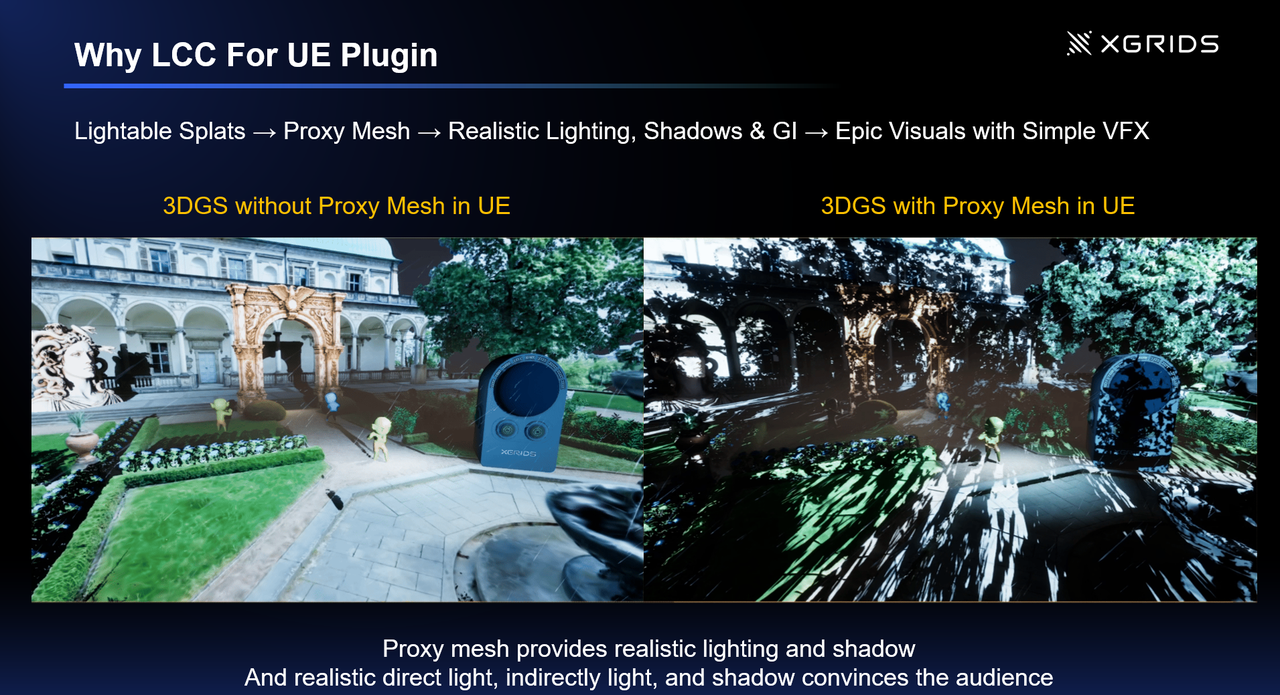
A 3DGS scene stores color and opacity but no surface normals, so Unreal Engine needs a mesh of the same shape to compute lighting, shadows, and collision. One capture produces both: the 3DGS scene carries what the player sees, and the mesh carries what the engine has to compute.
With the mesh placed under the capture as a proxy, the color still comes from the 3DGS scene, the lighting response comes from the mesh, and the mesh never appears on screen. Characters cast shadows onto the captured ground, and the level takes on whatever lighting the game calls for, including the sky and weather changes in this build. The closer the mesh follows the shape of the capture, the more convincing the light and shadows, which is why this build used a mesh from LixelStudio.
Proxy mesh relighting is part of the plugin's Pro edition. The free edition loads and renders the same scene and includes collision and navigation.
The build followed seven steps. Each one below says what was done and links to the plugin documentation for the settings.
One walk through the site with an XGRIDS scanner produces the data for both the 3DGS scene and the mesh. The Capture Guide covers route planning for outdoor scenes.
LCC Studio reconstructs the capture into a 3DGS scene. We exported it as .lcc2, the plugin's primary format, and it carries both LOD and collision data, which our .ply, .sog, and .spz exports do not.
The lighting mesh came from LixelStudio, which processes the same scan data. All the lighting and shadows in this build use that mesh.
The LCC Plugin for UE supports Unreal Engine 5.4 through 5.8 on Windows and Linux. The plugin is built per engine version, so the download has to match the engine you run. Once it is installed, the scene loads into a level as an actor.
Plugin introduction · Download
With collision enabled, the player and the guardians stand on the captured ground. The plugin loads collision in chunks around the camera, and two settings prevent the usual problems. Start the player slightly above the ground so the character does not fall through before collision is built. When AI characters use Unreal's navigation system, set the collision load distance to cover the whole level so the navigation mesh builds once.
Place the mesh in the level as a proxy mesh, switch the 3DGS scene to Lit, and set its normal mode to ProxyMesh. The mesh only has to match the shape of the capture. It needs no textures, and a simplified version is enough. From this point the scene responds to the engine's lights and shadows.
Proxy Mesh · Editions and Licensing
Astra reaches the Unreal Editor through Epic's MCP plugin and reaches Blender through Blender MCP. Setup means access to the model, both MCP servers configured, and a first message that tells the agent what is already in the level: which actor is the captured scene, which assets exist, and what role each one plays.
The Tripo models and the PortalCam prop went into the level next, followed by the sky and weather system. Before packaging, check that the Pro license is active before packaging, or licensed features fall back to free-edition behavior in the build.
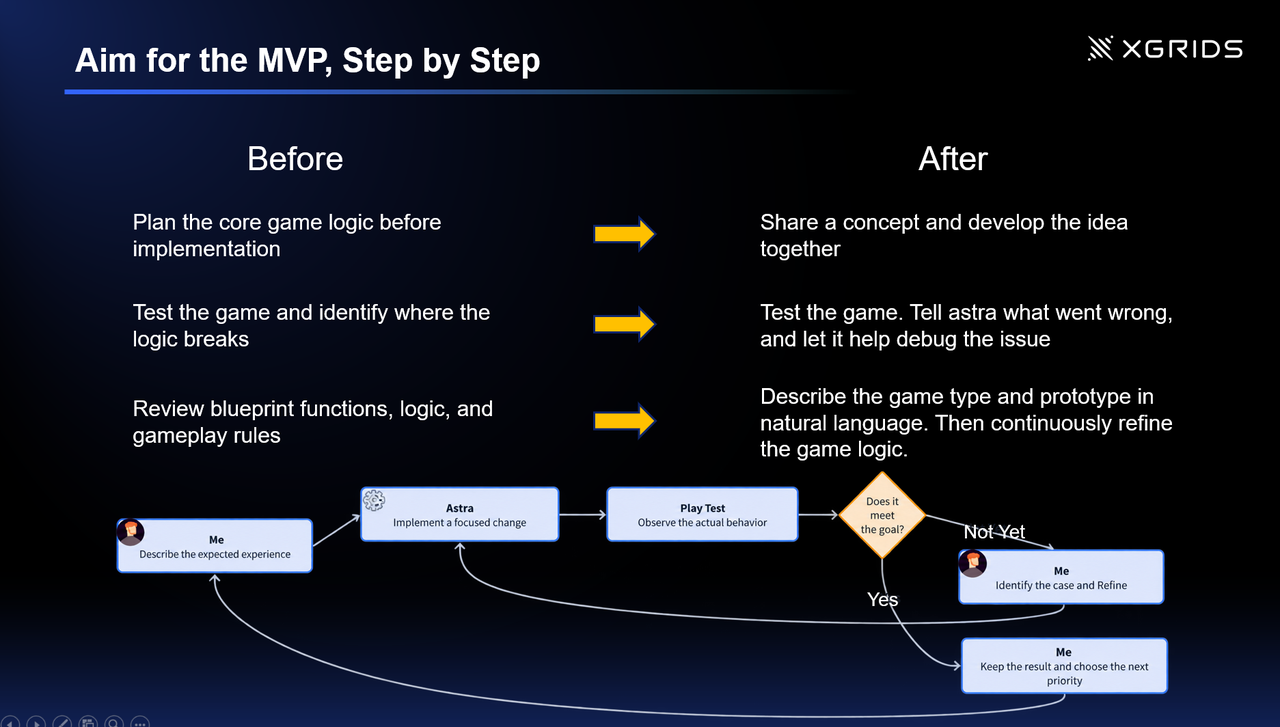
You describe the experience you want, the agent implements one focused change, you play the result, and you tell it what was wrong. Oliver worked in that loop from the first prompt to the playable build.
Prompts. He opened with a concept for the game and developed the design with Astra as they went. Each prompt after that described a game type or a behavior in plain language. There was no specification written up front and no Blueprint graph to plan.
Iteration. The first target was a minimum playable version: cores to collect, guardians to fight, a portal to reach. Each round changed one thing. After each change he played the game, compared what happened with what he expected, and either refined the request or kept the result and chose the next priority. When the logic broke, he described the failure to Astra and had it help find the cause.
Hand-tuning. Astra wrote the systems. Judging them stayed with the person at the keyboard: whether combat feels right, and where things sit in the level. Level layout was tuned by hand in the editor. Oliver's account in the webinar was that the hours once spent planning logic and reading Blueprints went into play-testing and game feel.
| Before | With the agent |
| Plan the core game logic before implementation | Share a concept and develop the idea together |
| Test the game and find where the logic breaks | Test the game, tell Astra what went wrong, and let it help debug |
| Review Blueprint functions, logic, and gameplay rules | Describe the game in natural language, then keep refining |
Two things to plan for. Agents take different routes from identical prompts, so a second run will not reproduce this build step for step. And an agent working inside a game engine reads editor state, writes Blueprints, and reviews its own output, which uses far more tokens than a conversation does.
The first playable build took under two hours and 116.2 million tokens.
| Agent-driven | By hand | |
| Time to first playable | Under 2 hours | About 8 to 9 hours (builder's estimate) |
| Tokens | 116.2M | 0 |
| Human input | Prompting, play-testing, level tuning | All of it |
The tokens went to logic, UI, and one prop. The environment used none, because it came from the capture.
It suits people who already have some footing in 3D tools or AI tooling and want to prototype faster. For them the gain is large. The environment comes from a capture, the props come from a generator, and the game logic comes from a conversation, so one person can reach a playable prototype in an afternoon.
As Oliver's webinar slide put it: for professionals, AI makes the workflow faster; for beginners, AI makes the workflow more accessible. Accessible still comes with prerequisites, a point both Oliver and Tripo's Ren Fu made during the session.
What the workflow takes on:
What the builder still brings:
The under-two-hours figure also reflects a builder who already knew Unreal Engine and the plugin. A first attempt will take longer.
Prototyping a game this way is far easier than building one by hand, and it opens the work to many more people. Skills, hardware, and budget still decide who can use the workflow today.
The four routes below run from playing the build to capturing your own location. The first three need no scanner.
| Start here | What you need | What you get |
| Play the build | A PC with a recent GPU | The game |
| Open the example project | Unreal Engine 5.4 to 5.8, the free plugin, a content pack of about 470 MB | 13 levels with sample 3DGS data covering loading, light modes, collision, navigation, and more |
| Prototype on the web | LCC Web SDK, three.js, an LLM agent | An interactive scene you share by URL |
| Bring your own capture | An XGRIDS device,LCC Studio, the Pro edition for relighting | Your own location as a level |
Web or Unreal: which workflow fits? The comparison below is from the webinar.
| Web workflow | Unreal workflow | |
| Starting cost | Lower | Higher |
| Prototype speed | Very fast | Fast with an agent |
| Sharing | URL | Packaged application |
| Simple interactions | Very suitable | Suitable |
| Complex gameplay | More custom work | Strong built-in systems |
| Rendering and game systems | Lightweight | Much more complete |
| Agent friendliness | Small codebase, direct feedback | More complex state, improved by MCP |
| Best use | Prototype, viewer, interactive experience | Full game, production experience |
The same capture can be restyled, viewed in VR, and extended to much larger scenes. The webinar showed each of these as work in progress.
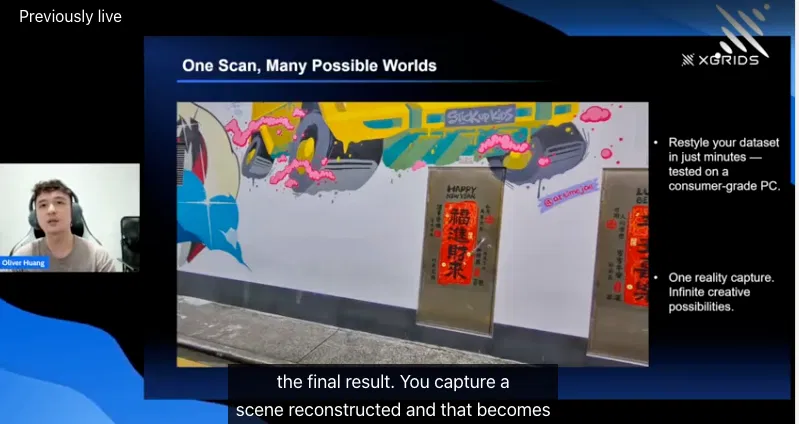
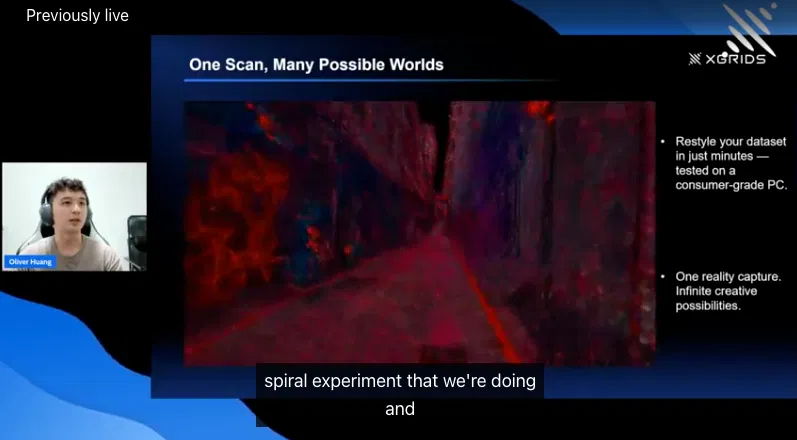
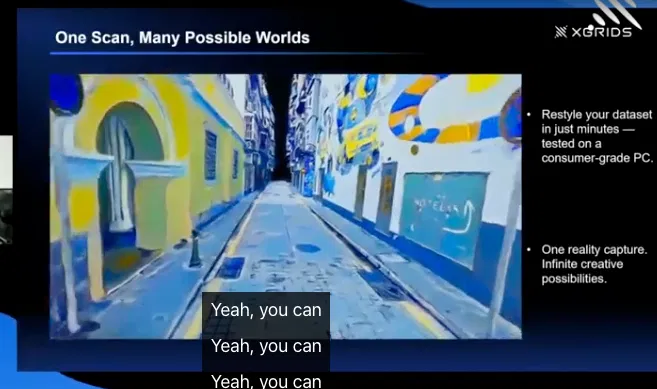
The same pattern applies outside games. A location scout can scan a block and have an agent populate it for previsualization. A training team can scan a facility and build scenario logic on top. A heritage site can become explorable, with narrative layered over the capture.
In each case the capture stays the reference. Geometry and scale come from the place, and generation changes what sits on top of it.
XGRIDS' 3D Gaussian Splatting (3DGS) solution captures the visual characteristics of real-world environments, while Astra helps developers build interactive experiences within them. Although AI-powered tools can accelerate game development, recreating a large, specific real-world location from scratch can require repeated and detailed prompting, and substantial computational resources to achieve the desired result. Maintaining visual fidelity and spatial consistency can be particularly challenging across large environments. Traditional mesh-based workflows can also involve significant modeling and texturing effort when recreating real-world scenes.
Using XGRIDS' 3DGS solution, developers can capture a real-world location and import the reconstructed scene into Unreal Engine. This provides a high-fidelity visual foundation based on the actual environment, preserving its appearance and spatial characteristics without requiring developers to recreate every detail manually.
Astra complements this foundation by helping developers generate gameplay elements such as game logic, quest systems, combat mechanics, and user interfaces. Rather than relying on AI to recreate the entire environment, developers can focus on designing the interactive elements and experiences that take place within it.
Together, the two technologies support a more streamlined game development workflow. XGRIDS 3DGS reduces the effort involved in reproducing real-world environments, while Astra helps accelerate the creation of gameplay systems and interactive content. This combination offers developers a practical way to build immersive games and interactive applications based on real-world locations, with less manual scene creation.
The LCC Unreal Plugin loads .lcc2, .lcc, .sog, .spz, and .ply files in Unreal Engine 5.4 through 5.8. Of these, .lcc2 supports LOD, while .sog, .spz, and .ply do not.
The plugin has a free edition and a Pro edition. The free edition loads and renders every supported format and includes collision, navigation, and VR. Proxy mesh relighting, Tiled Rasterization (experimental), working color space conversion, and more than 50 clipping volumes or section planes require Pro.
Yes, once the scene has collision. Whether a scene comes with collision data depends on its format and on the source data. Scenes in .lcc2 or .lcc ship collision data, which the plugin loads around the camera as the player moves. Single-file formats (.sog, .spz, .ply) carry none, so add blocking volumes or a mesh with collision enabled.
This build ran at about 120 fps at LOD 0 with gameplay, dynamic sky, and weather active, on an NVIDIA GeForce RTX 5080. Frame rate depends on splat count, resolution, and hardware.
Scan data courtesy of Lukasz Mirocha.
Lixel L3 achieves ≤5 mm accuracy at 1σ across 1,524 point pairs. See the five-step validation workflow and Leica TS60 benchmark test data.
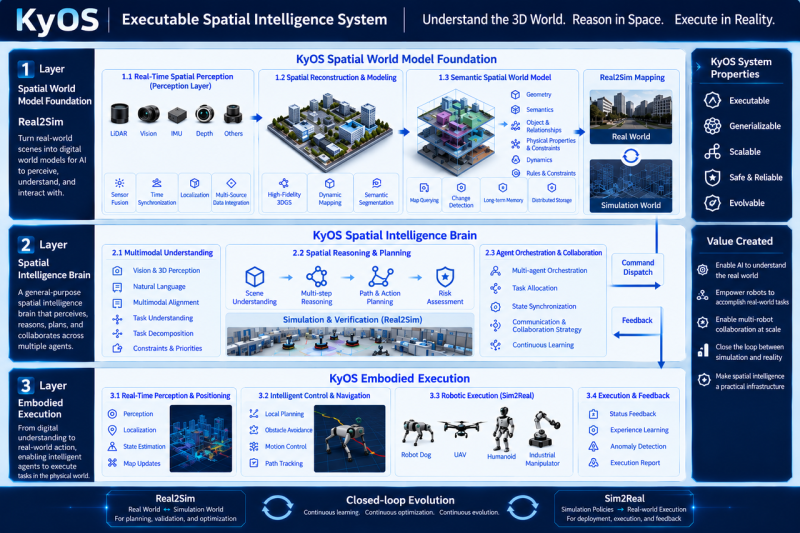
Scaling embodied AI requires KyOS, a closed-loop architecture coordinating perception, task planning, and reflex control across different timescales.

Turn static 3DGS captures into dynamic lighting variations using AI relighting tools to test sunsets, night looks, and mood changes in minutes.
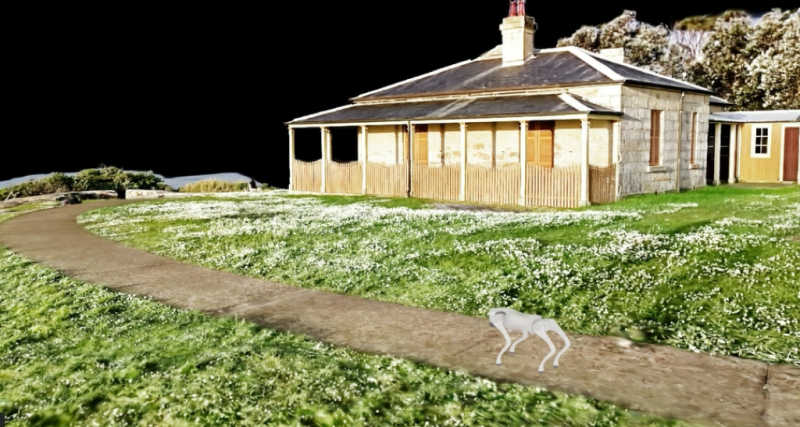
From Real-World Capture to Interactive Simulation