Film
Turn real-world Gaussian scenes into production-ready virtual sets. Relight, edit, and enrich environments with cinematic effects while reducing location shoots and production costs.
The Unreal Engine plugin built for billion-scale real-world Gaussian Splatting. Import, edit, relight, and render massive 3DGS scenes in-engine, for film, digital twins, simulation, games, and VR.
View Sample ProjectsTurn real-world Gaussian scenes into production-ready virtual sets. Relight, edit, and enrich environments with cinematic effects while reducing location shoots and production costs.
Create interactive digital twins from captured spaces for visualization, design review, operations, and immersive collaboration.
Build editable, high-fidelity simulation environments for training, robotics, autonomous driving, and industrial applications with greater speed and lower cost.
Convert captured environments into immersive game worlds and VR experiences by combining Gaussian scenes with existing Unreal assets and deploying to leading XR devices.
The only UE solution that can handle billion-scale Gaussian data today. LCC2's extreme compression loads billion-point 3D Gaussian scenes into Unreal Engine in one piece while preserving high fidelity. Covering hundreds of thousands of square meters of the real world, it brings large campuses, factories, and historic districts into the digital world.
*The real-world area covered depends on scene complexity and the level of scan detail.
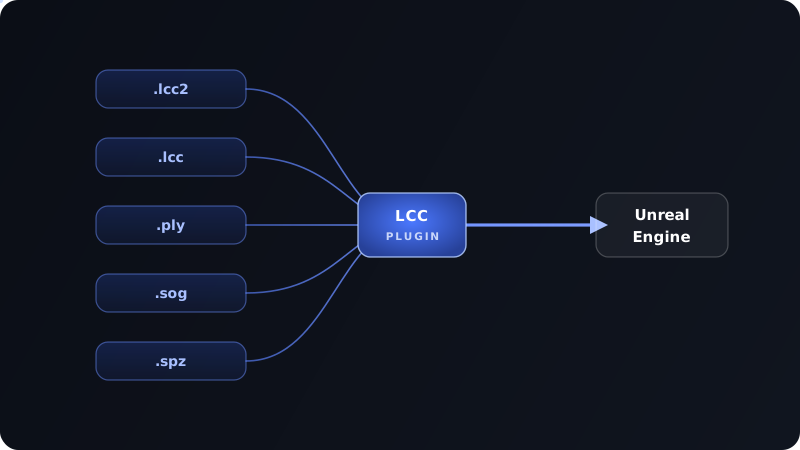
Compatible with LCC2, LCC, PLY, SOG, and SPZ Gaussian Splat formats, so your existing 3DGS assets go straight into Unreal Engine with no format conversion. For high-point-count scenes, the native LCC2 format delivers higher real-time frame rates and smoother performance, holding up even in massive scenes: a 50-million-Gaussian scene renders at around 60–90 FPS.
3D Gaussians are relit using the geometry of a same-scale mesh, producing accurate cast shadows, self-shadowing, and reflections. The resulting 3D Gaussian scenes carry controllable, realistic lighting, ready for the LED wall in virtual production.


Native depth information gives 3D Gaussians true focus falloff and foreground-to-background layering, not a flat, billboard look. Use depth of field to shape your camera language and build atmosphere for cinematic camera moves and storytelling.
Real-world 3D Gaussians blend naturally with your existing mesh asset library. Layer, replace, and build freely inside scanned scenes. Each LCC scene ships with a same-scale mesh, collision-ready out of the box.
Streaming LoD sustains high frame rates, keeping massive real-world 3D Gaussian scenes stable and smooth in VR headsets. Put on a headset and wander through a fully captured 3D space as if you were actually there. Compatible with PICO, Meta Quest, and other mainstream VR headsets.
From on-site capture and reconstruction to in-engine render and deployment, the entire pipeline is built in-house by XGRIDS on one unified data format. No switching between multiple tools, or rework from format conversion. Faster to deploy, more consistent results.
01 / Games
A complete reference project with plugin setup, runtime calls, and packaging paths preconfigured.
02 / Gallery
A polished reference for reviewing captured spaces, lighting, and spatial presentation inside Unreal.
03 / Furniture Replacement
Swap, place, and adjust 3D furniture inside a captured scene, making design validation and option comparison quick work.
Real-world Gaussian scenes power immersive XR news broadcasting, with high-performance streaming holding the smooth, stable frame rates a national live broadcast demands.
Active Retech (Japan) turns architectural design proposals into 1:1 immersive 3D experiences inside Unreal Engine, helping clients understand and review them accurately for faster, more confident decisions.
Credit to Active Retech (Japan)
For teams extending runtime behavior, plugin modules, and low-level scene control.
Open C++ tutorialFor designers and technical artists who need fast iteration inside Unreal Editor.
Data Format Support
Rendering & Performance
Scene Editing
Post-Processing
Color Management
XR & Virtual Production
Digital Twins & Simulation
Platform Support
Includes all features available in the Free version.
Rendering & Performance
Scene Editing
Physically Based Relighting
Professional Color Management
Yes. The LCC Plugin for UE supports the mainstream 3D Gaussian Splatting formats (.lcc2, .lcc, .ply, .sog, and .spz), so your existing Gaussian assets can be brought into Unreal Engine directly. For very large scenes, we recommend converting to the native LCC2 format for higher frame rates.
Version 1.0.0 and later support UE 5.4–UE 5.8; versions before 1.0.0 support UE 5.1–UE 5.7.
The biggest differences are scale and realism. Most UE Gaussian plugins stop at the million-point range, while the LCC Plugin for UE is currently the only solution that loads billion-scale 3D Gaussian scenes into Unreal Engine in full. It also supports same-scale mesh-based relighting (cast shadows, self-shadowing, reflections) and native depth of field; most comparable solutions can't do self-shadowing or reflections at all.
Yes. The plugin natively supports Unreal Engine nDisplay and disguise, and can be quickly extended to Unreal-based virtual production platforms like Pixotope and Aximmetry. It is Blueprint-callable and supports OCIO / ACES production-grade color management. Built on LCC2's high-performance rendering, it sustains high frame rates even for very large 3D Gaussian scenes, meeting the real-time and smoothness demands of LED virtual production and XR broadcasting. In testing, a 50-million-Gaussian scene renders at around 60–90 FPS.
Mainstream VR / XR devices including Meta Quest and PICO are supported. The plugin streams Gaussian scenes to headsets in real time via PC streaming, and combined with streaming LoD (Level of Detail), even large-scale real-world scenes stay smooth with high frame rates and low latency, so users can step inside fully captured real-world spaces.
Free relighting computes lighting from simulated normals on the 3D Gaussians, letting you quickly adjust overall lighting — suitable for previews and design presentations. But without real geometry, the Gaussian scene can't produce accurate self-shadowing, so lighting relationships and reflections are relatively limited.
Pro relighting computes lighting from a mesh generated at the same scale as the Gaussian scene, using real normals in rendering to achieve more accurate shadows, reflections, and self-shadowing on the Gaussian scene — delivering more realistic, physically based lighting that meets the needs of film virtual production and cinematic-grade rendering.
Your next Unreal project starts here. Download the LCC Plugin for UE.